
Gloss Download

Tell a website what to change. It stays changed.

Gloss is a Chrome side panel. Say what bothers you about the page in front of you. Gloss writes a small script for that site and runs it every time you come back.

Free. Version 0.2.2. Chrome 135 or newer.

Lemon olive oil cake — Salt & Stone
saltandstone.example/recipes/lemon-olive-oil-cake
RecipesTravelShopSearch
Advertisement

Recipes / Baking / Cakes

Lemon olive oil cake

By Mara Lind · Updated March 3 · 14 min read

The first time I made this cake it was raining in Lisbon and the oven in our rented flat ran forty degrees hot. It came out dark at the edges and wet in the middle, and we ate all of it standing at the counter.

It took four more tries to get right. The trick is less flour than you think and a good, grassy oil. Do not use the oil you fry with.

Ingredients

  • 200 g flour
  • 3 eggs, at room temperature
  • 180 g sugar and the zest of two lemons
  • 160 ml olive oil

Rub the zest into the sugar with your fingers until it smells like a lemon grove and feels like wet sand.
We use cookies to remember the cakes you liked and to show you more of them.

Accept all Settings

saltandstone.example

Runs on saltandstone.example and its subdomains

Enter to send
A replay that runs in this page. Pick a request in the panel, or type one. The switches turn each tweak off again.

How it works

One sentence in. One script out, kept for that domain.

  1. 1

    You describe it

    Open the panel beside the page and write what you want different. Plain words are enough. “Hide the recommended videos.” “Make the prices bigger.”

  2. 2

    Gloss reads the page

    It collects a trimmed outline of the DOM, the CSS, a short network snapshot, and a screenshot if you allow one. Before writing anything, the model can ask the page a few questions: find an element, count matches, read a computed style.

  3. 3

    It writes a tweak

    The answer is a short script, not a suggestion. You can read it, edit it, choose the world it runs in, and choose when it runs.

  4. 4

    Chrome keeps running it

    The tweak is registered with Chrome’s user scripts API for that domain and its subdomains, and runs on every visit. Each tweak has its own switch. Select one to keep talking about it.

Script that runs on this domain
// Hide popups on this domain
gloss.css("hide-popups", `
  #cookie-banner,
  [class*="newsletter" i],
  [id*="consent" i] {
    display: none !important;
  }
`);
Runs on
saltandstone.example
World
Isolated
When
document_idle

Mark area

Point at the part you mean.

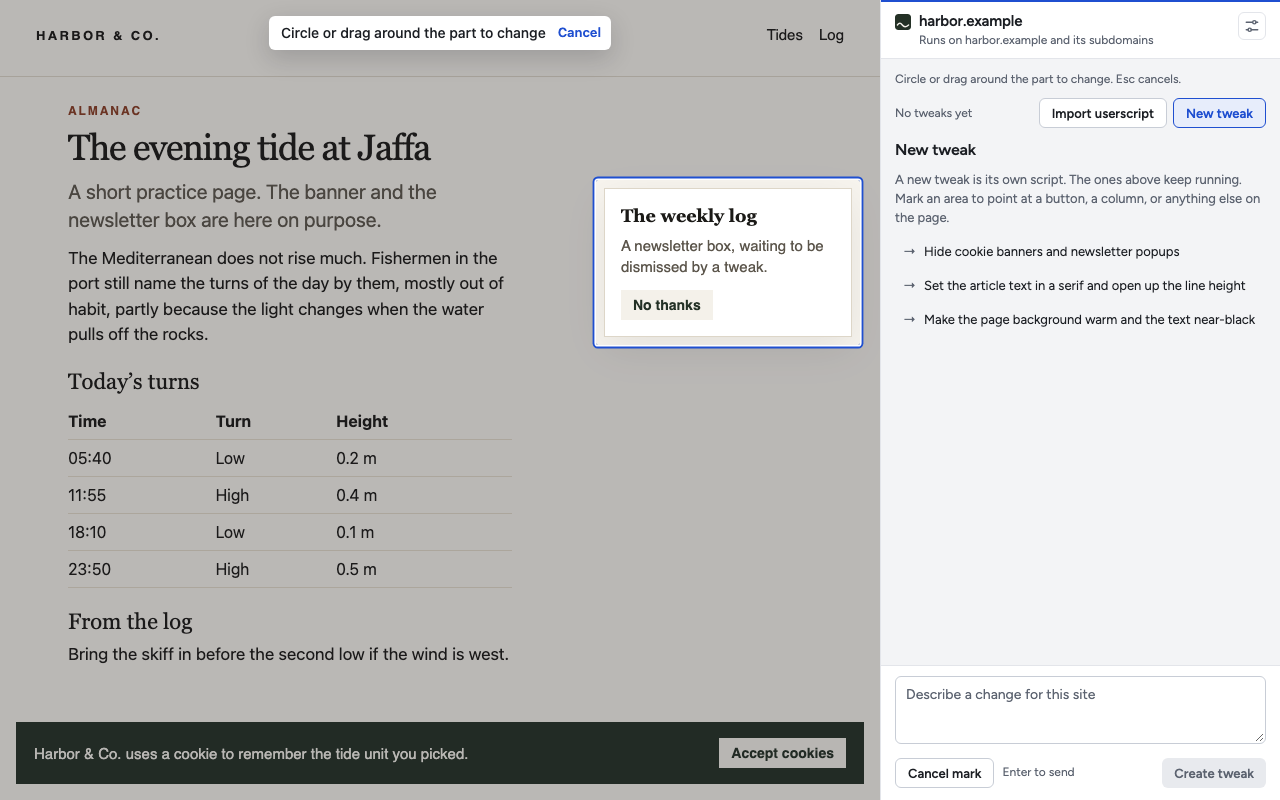
Before you send, circle a button or drag a rectangle around a column. Gloss finds the elements inside the mark and sends them with a crop of what you drew. “Make this smaller” finally has a this.

The crop is taken when you finish drawing, so you can scroll away and the picture still shows what you marked. Esc drops the gesture.

The Gloss side panel beside a page. A newsletter box on the page is outlined with a blue mark, and a hint at the top reads: Circle or drag around the part to change.

Userscripts

Bring your Tampermonkey scripts.

Paste a userscript, or choose a .user.js file. Gloss keeps it on the domain you are viewing, and its @match and @exclude rules still decide which pages run it.

The usual helpers are there when the header grants them:

GM_addStyle GM_getValue GM_setValue GM_xmlhttpRequest GM_setClipboard GM_notification GM_openInTab GM_registerMenuCommand GM.*

Going the other way works too. Copy as userscript turns any tweak into a file Tampermonkey can install.

// ==UserScript==
// @name        Quiet header
// @match       https://news.example/*
// @exclude     https://news.example/live/*
// @grant       GM_addStyle
// @run-at      document-start
// ==/UserScript==

GM_addStyle(`
  .site-header { position: static !important; }
  .breaking-ticker { display: none !important; }
`);

Privacy

Nothing leaves the page until you ask.

Gloss reads a page only when you ask it to create or change a tweak. That request goes to the Gloss server, which asks a model for a script and keeps none of the page.

  • Secrets are stripped first. Input values are left out of the outline. Query parameters that look like tokens, and fields like password or access_token, are redacted before anything leaves the browser.
  • Screenshots are optional. Chrome only allows them with access to all sites. Say no and tweaks still run from the DOM, the CSS, and the network.
  • One domain at a time. There is no “all sites” mode. A tweak runs on its domain and its subdomains, and only after you allow that domain.
  • Tweaks live in your browser. They stay in chrome.storage.local unless you sign in to sync them. Sync is the only thing the server stores.

Read the privacy policy

Install

Install Gloss.

Gloss is not in the Chrome Web Store yet, so Chrome loads it as an unpacked extension. It does not update itself. Come back here for a new version.

  • gloss-0.2.2.zip

    The Chrome extension · 151 KB

    Download

The extension already includes its server address.

  1. Load the extension

    Unzip it. Open , turn on Developer mode, choose Load unpacked, and select the gloss-0.2.2 folder.

  2. Allow user scripts

    On Chrome 138 and newer, open Details for Gloss and turn on Allow user scripts. That switch is what lets a tweak run.

  3. Open Gloss

    Pin Gloss and press Alt Shift G. It talks to the Gloss server on its own. Describe your first change.